
Designing Flutter App Architecture using BLoC and Repository pattern
Creating a well-structured architecture is crucial for building scalable, maintainable, and efficient Flutter applications. In this blog post, we will explore various architectural approaches that you can adopt for your Flutter app development projects and in detail we will look into BLoC with Repository pattern. Each architecture has its strengths and is suitable for different types of applications, so let’s dive in and examine your options.
1) MVVM (Model-View-ViewModel)
Overview: MVVM is an evolution of MVC. It introduces a ViewModel, which acts as an intermediary between the View and the Model. It’s particularly useful when dealing with complex UI logic.
Pros:
- Improved separation of concerns compared to MVC.
- More maintainable and testable code.
- Better support for data binding and reactive UI updates.
Cons:
- Can be overkill for simple apps.
- Learning curve for those new to reactive programming and ViewModel concepts.
- Might require additional packages or libraries for full MVVM implementation.
2) Bloc (Business Logic Component)
Overview: Bloc is a Flutter-specific architecture pattern that focuses on managing the flow of data and events in your app. It uses streams and sinks for reactive programming, making it highly suitable for handling state.
Pros:
- Excellent for managing complex state.
- Separation of UI and business logic.
- A strong community with available packages (e.g., the flutter_bloc library).
Cons:
- Learning curve for those new to reactive programming.
- Can be verbose in some cases.
- May not be necessary for simpler applications.
3) Provider
Overview: This is a state management library that can be used with any architectural pattern. Provider makes it easy to share data between widgets and to manage the state of the app.
Pros:
- Easy to learn and use.
- Flexible and can be used with any architectural pattern.
- Supports lazy loading of data.
- Reduces boilerplate code.
- Devtool friendly.
- Improves scalability.
- Makes InheritedWidgets easier to use.
Cons:
- May accidentally call unnecessary updates.
- Not as efficient as some other state management solutions.
- Can be difficult to debug complex state changes.
I did not consider riverpod as it was migrating to a newer version, at the time of writing
Understanding the BLoC Pattern
Reference: https://pub.dev/packages/flutter_bloc
The BLoC pattern separates your app’s UI components from the business logic and state management. BLoC stands for Business Logic Component, and it employs reactive programming principles, using streams and sinks to manage data and events. BLoC is particularly well-suited for handling complex state management requirements in Flutter apps.
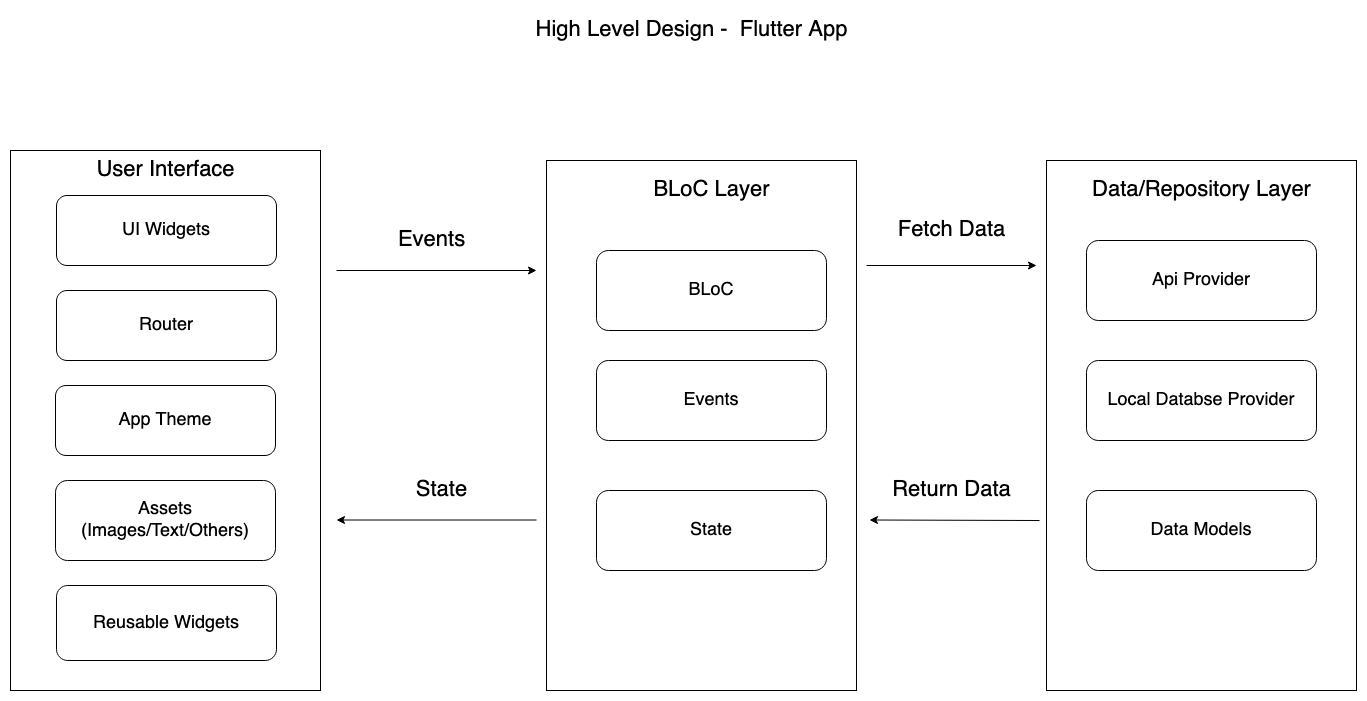
Key Components of BLoC
- Bloc: Represents the business logic unit, managing state changes and data flows.
- Events: Trigger actions that lead to state changes.
- States: Represent different states of your application and are emitted by the BLoC in response to events.
- Streams and Sinks: Used for handling asynchronous data flows.
Implementing the Injectable Repository Pattern
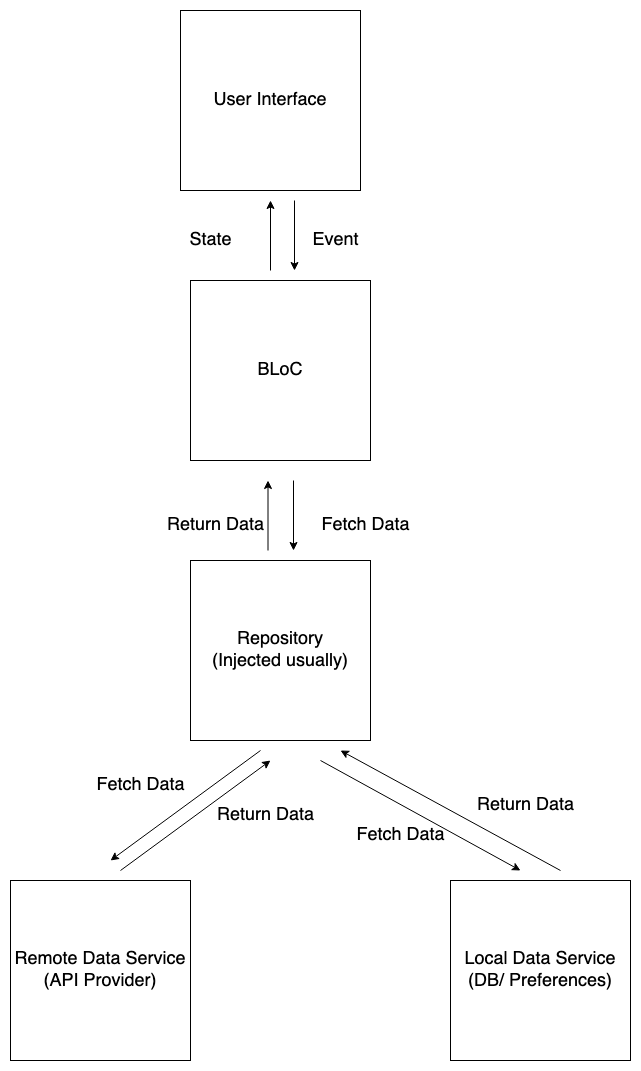
Highlights:
1. The app uses the BLoC package to manage the state of the app.
2. The BLoC receives events from the UI and sends requests to the repository.
3. The repository is responsible for getting data from the network or database.
4. The BLoC then updates the state of the app based on the data that it receives from the repository.
5. The updated state is then reflected in the UI.
The Injectable Repository Pattern is an architectural approach that separates data retrieval and manipulation from the business logic. It employs dependency injection to provide the necessary data sources (e.g., API calls, databases) to your BLoCs. This pattern enhances testability, maintainability, and scalability. Key Components of Injectable Repository Pattern
- Repository: Acts as an intermediary layer between your BLoCs and data sources, abstracting the data retrieval and storage logic.
- Data Sources: Interfaces or classes responsible for interacting with external data, such as APIs, databases, or shared preferences.
- Dependency Injection: A technique that provides the necessary dependencies (e.g., repositories) to your BLoCs.
Integrating BLoC with Injectable Repository Pattern
-
Create Repositories: Define repositories that abstract data access. These repositories should handle interactions with data sources (e.g., REST API, local database) and return data models to the BLoCs. Use ‘RepositoryProvider’ to inject repositories to BLoC
-
Configure Dependency Injection: Use the injectable package to set up dependency injection. Register your repositories and data sources, making them available for injection into BLoCs.
-
Implement BLoCs: Create BLoCs that utilize the injected repositories to fetch and manipulate data. The BLoCs emit different states based on the data retrieved and processed.
-
UI Integration: Connect your Flutter UI components to the BLoCs. Use Flutter’s BlocProvider to manage BLoCs and streamline data flow between BLoCs and UI components.
Example
Below is a sample AuthenticationRepository code. The AuthenticationRepository exposes a Stream of AuthenticationStatus updates which will be used to notify the application when a user signs in or out.
In addition, there are logIn and logOut methods which are stubbed for simplicity but can easily be extended to authenticate with any auth provider like FirebaseAuth for custom authentication provider.
import 'dart:async';

enum AuthenticationStatus { unknown, authenticated, unauthenticated }

class AuthenticationRepository {
  final _controller = StreamController<AuthenticationStatus>();

  Stream<AuthenticationStatus> get status async* {
    await Future<void>.delayed(const Duration(seconds: 1));
    yield AuthenticationStatus.unauthenticated;
    yield* _controller.stream;
  }

  Future<void> logIn({
    required String username,
    required String password,
  }) async {
    await Future.delayed(
      const Duration(milliseconds: 300),
      () => _controller.add(AuthenticationStatus.authenticated),
    );
  }

  void logOut() {
    _controller.add(AuthenticationStatus.unauthenticated);
  }

  void dispose() => _controller.close();
}
You can look into simple example from blocklibrary website. Managing login and routing user to home page using repository pattern is explained in the link
Source code is available in link
Testing
1) Install the bloc_test package:
flutter pub add bloc_test
2) Create a new test file for your BLoC:
flutter test my_bloc_test.dart
3) Import the bloc_test package:
import 'package:bloc_test/bloc_test.dart';
4) Create a blocTest function:
blocTest('Test For Login', () {
  // Create a new instance of your BLoC.
  final bloc = AuthenticationBloc();

  // Add some events to the BLoC.
  bloc.add(AuthenticationEventLogin());

  // Assert that the BLoC emits the expected states.
  expect(bloc.state, AuthenticationStateSuccess());

});
5) Run the tests:
flutter test my_bloc_test.dart
Benefits of this Approach
Enhanced Separation of Concerns
By separating data retrieval and manipulation logic into repositories and BLoCs, you achieve a clean separation of concerns, making your codebase more modular and maintainable. Testability
With the Injectable Repository Pattern and BLoC, you can easily write unit tests for your business logic and data access layers, ensuring code reliability and quality. Scalability
As your app grows, this architecture scales gracefully. You can add new features, data sources, and BLoCs without causing excessive code coupling.